
Operation
Exclude holidays
Custom holiday
Days Calculator — Date Difference, Business Days, Holidays & More
Counting days on a calendar is slow, error-prone and genuinely frustrating — especially when the number actually matters. Miss a visa deadline by one day and your application is void. Get a notice period wrong and it becomes a legal dispute. Calculate a project deadline incorrectly and you lose client trust.
Our free days calculator removes the guesswork entirely. Enter any two dates and get the exact gap in seconds — total days, business days, weeks, hours and minutes. Five tools in one: use the days calculator to find calendar days between any two dates, calculate business days only, exclude specific holidays, add or subtract days from any date, and get a full weekday breakdown. No signup, no limits.
What This Days Calculator Does
Five tabs, each solving a different date calculation problem:
Calculate Days — the core days calculator. Counts every calendar day between two dates including weekends. Shows total days, weeks, months, years, hours and minutes in one result.
Add / Subtract Days — enter a start date and a number of days to find exactly what date falls that many days forward or backward. Answers questions like “what date is 90 days from today?” instantly.
Business Days — counts only Monday to Friday between two dates. Shows business days and weekend days separately. Essential for contracts, HR deadlines and project timelines.
Holidays — use the days calculator with holiday exclusions. Choose from Christmas, New Year, Easter, Thanksgiving, Valentine’s Day, Halloween — or add any custom date. Useful for project planning and legal deadlines where public holidays don’t count as working days.
Weekdays — shows exactly how many Mondays, Tuesdays, Wednesdays etc. fall within your date range. Useful for payroll, shift scheduling and resource planning.
All tabs include an Include end date toggle so you control precisely whether the end date is counted in your total.
Days Calculator — Real Examples
Here are some real examples:
Calculation |
Result |
|---|---|
|
1 Jan 2026 → 31 Dec 2026 |
364 days · 52 weeks · 260 business days |
|
1 Jan 2026 → 1 Jul 2026 |
181 days · 25 weeks · 4,344 hours |
|
15 Mar 2026 → 15 Jun 2026 |
92 days · 13 weeks · 66 business days |
|
1 Aug 2026 + 90 days |
29 October 2026 — Thursday |
|
1 Jul 2026 − 60 days |
2 May 2026 — Saturday |
|
Jan 2026 — how many Mondays? |
5 Mondays (5, 12, 19, 26 Jan) |
When You Need a Days Calculator
Visa and immigration — immigration authorities require the exact number of days spent in a country. One day over the limit can void your application or trigger penalties. Use the days calculator to count days between your entry and exit dates accurately. For Schengen visas the limit is 90 days in any 180-day rolling period — precision is not optional.
Notice periods and employment contracts — contracts specify notice periods in calendar days — 30, 60 or 90 days. Use the Add / Subtract tab to find the exact end date of any notice period. A 60-day notice starting 1 July 2026 ends on 29 August 2026. Getting this wrong creates a legal dispute.
Project deadlines — use the business days calculator to find how many working days exist between today and your deadline. The Business Days and Holidays tabs together give you the real number of available working days — not a rough estimate.
Probation periods — a 90-day probation starting 1 August 2026 ends on 29 October 2026. Use the Add / Subtract tab and get the exact date and day of the week in one click.
Payroll and HR scheduling — the Weekdays tab shows exactly how many Mondays, Tuesdays etc. fall in any period. Essential for calculating hourly staff costs, shift allocation and leave entitlement.
Anniversary and milestone tracking — use the days calculator to find exactly how many days, weeks and months since a wedding, company founding, first date or any personal milestone.
Business Days vs Calendar Days — What Is the Difference?
One of the most common mistakes when using a days calculator is confusing calendar days with business days. They give very different results.
Calendar days count every single day including weekends and holidays. When someone says “the package arrives in 7 days” they typically mean calendar days.
Business days count only Monday to Friday. Weekends and sometimes public holidays are excluded. When a contract says “30 days notice” in an employment or legal context, it almost always means business days.
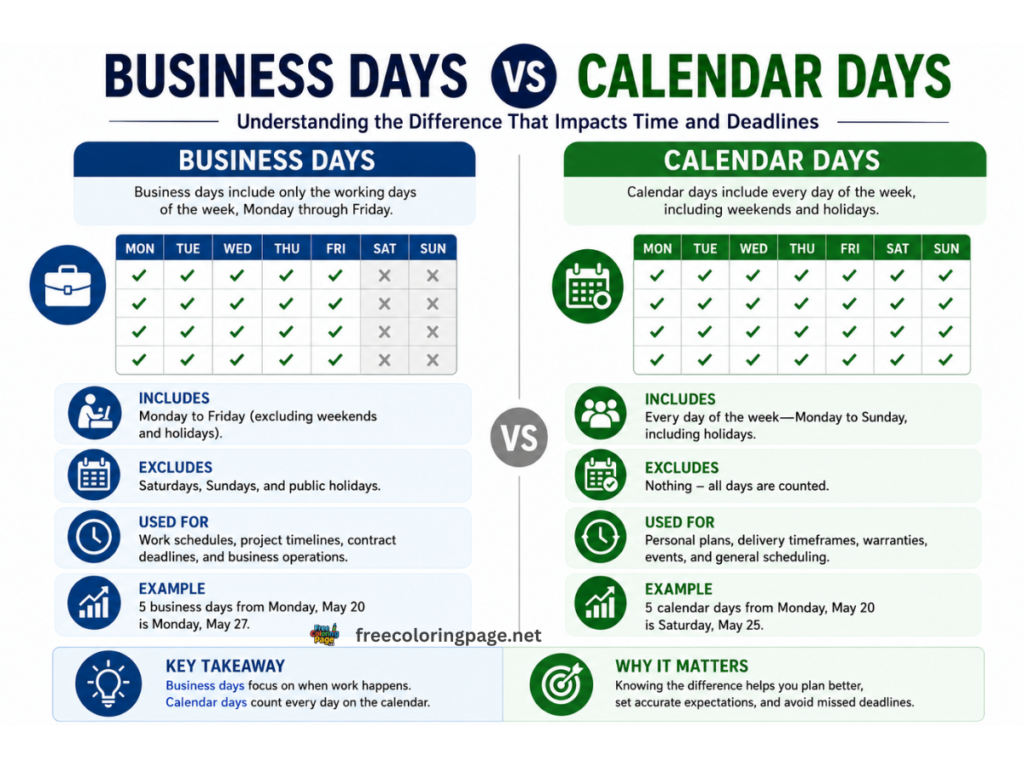
Quick reference:
Period |
Calendar Days |
Business Days |
|---|---|---|
|
1 week |
7 days |
5 days |
|
2 weeks |
14 days |
10 days |
|
1 month (approx) |
~30 days |
21-23 days |
|
3 months (approx) |
~90 days |
~65 days |
|
6 months (approx) |
~180 days |
~130 days |
|
1 year |
365 days |
261 days |
Use the Business Days tab in the days calculator to get the exact count — not an approximation.
How to Exclude Holidays from Your Day Count
The Holidays tab in this days calculator lets you pick exactly which holidays to exclude — without being locked into any country’s preset calendar. This is more flexible than every competitor.
Check any combination of Christmas, New Year, Easter, Thanksgiving, Valentine’s Day or Halloween. Or add any custom date — a regional bank holiday, company closure day or local observance that doesn’t appear on any standard list.
The result shows total days, exactly which holidays were skipped, and how many business days remain after those exclusions. Every excluded holiday is listed by name and date so you can verify the calculation before using it in a legal or financial context.
Other Free Countdowns and Calculators
- Age Calculator — Your exact age in years, months and days with birthday countdown and zodiac sign
- Days Until Christmas — Live countdown to Christmas
- Days Until Halloween — Live countdown to Halloween
- What Time Is It — Live local clock with world time for 100+ citie
Frequently Asked Questions
About This Tool
This days calculator is part of CalcDaysTime — a free suite of precise date and time tools built for accuracy. All calculations run entirely in your browser. Your dates are never collected, stored or shared with anyone.