
Time Card Calculator — Free Weekly Timesheet
You worked all week. Now you need the total hours, the gross pay, and whether any of those hours qualify for overtime — before you submit your timesheet or send the invoice. Doing this manually means adding up seven rows of hours and minutes, converting everything to decimals, and hoping you did not make an error somewhere in the middle.
This free time card calculator does all of it in seconds. Enter your clock in and clock out times for each day, deduct breaks, set your hourly rate and overtime rule — totals update instantly.
How to Use This Time Card Calculator
Step 1 — Select your days. Monday to Friday are checked by default. Tick Saturday or Sunday if you worked weekends. Uncheck any day you did not work — the calculator skips those rows entirely and only counts what is checked.
Step 2 — Enter clock in and clock out times. Type the hour and minutes for each day. Use the AM and PM buttons to set the correct period. Switch to 24hr mode if you prefer military time.
Step 3 — Add break time. Enter any unpaid breaks in minutes per day. A 30-minute lunch break entered as 30 will be deducted from that day’s total automatically.
Step 4 — Set your hourly rate. Enter your rate in the currency of your choice — US dollar, British pound, euro, Pakistani rupee, Indian rupee or UAE dirham. Gross pay updates with every change.
Step 5 — Choose your overtime rule. Select no overtime, overtime after 8 hours in a day, or overtime after 40 hours in the week. Set the overtime multiplier — 1.5 for time and a half, 2.0 for double time.
Results show instantly: regular hours, overtime hours, total hours, decimal hours and gross pay — broken down into regular pay and overtime pay separately.
How to Calculate Hours Worked
The formula is straightforward:
Hours worked = Clock out time − Clock in time − Break time
Clock in at 9:00 AM, clock out at 5:30 PM, with a 30-minute lunch break:
Raw time: 8 hours 30 minutes
Minus 30-minute break
Hours worked: 8 hours 0 minutes = 8.00 decimal hours
To calculate gross pay, multiply decimal hours by the hourly rate:
Gross pay = Decimal hours × Hourly rate
8.00 hours × $15.00/hr = $120.00
How to Convert Minutes to Decimal Hours
Payroll systems require decimal hours, not hours and minutes. Divide the minutes by 60 and add to the hours.
Minutes |
Decimal hours |
|---|---|
|
15 min |
0.25 |
|
20 min |
0.33 |
|
30 min |
0.50 |
|
45 min |
0.75 |
|
50 min |
0.83 |
|
90 min |
1.50 |
The calculator shows both formats — hours and minutes for readability, decimal hours for payroll submission.
How Overtime Works
Overtime is additional pay for hours worked beyond a standard threshold. According to the US Department of Labor, the federal Fair Labor Standards Act (FLSA) sets overtime at hours over 40 per week at a minimum of 1.5 times the regular rate. Some states and employers apply daily overtime after 8 hours in a single day.
Over 8h / day — any hours beyond 8 in a single day are overtime. If you work 10 hours on Monday, 8 are regular and 2 are overtime regardless of what you work the rest of the week. Standard in California and most shift-based industries.
Over 40h / week — the first 40 hours across the week are regular. Anything above 40 is overtime. This is the federal standard for most hourly workers.
OT multiplier — the rate at which overtime is paid relative to your regular rate. Time and a half (1.5×) means a $20/hr regular rate becomes $30/hr for overtime. Double time (2.0×) pays $40/hr for the same regular rate.
The calculator shows regular hours, overtime hours, regular pay and overtime pay as separate figures so you can see exactly how the gross total was reached.
Timecard vs Timesheet — What Is the Difference?
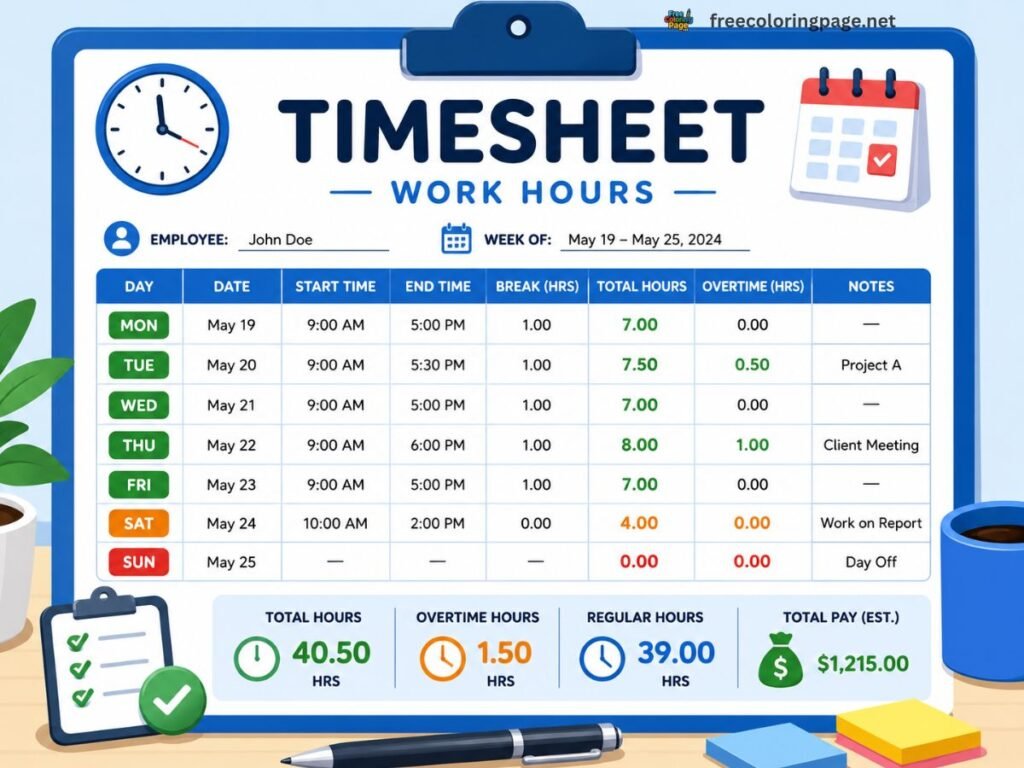
The terms are often used interchangeably but mean different things in practice.
A timecard records when an employee clocked in and clocked out each day. It is time-based — tracking presence and duration. Used primarily for hourly workers and payroll.
A timesheet records hours spent on specific tasks, projects or clients. It is activity-based — tracking what was worked on and for how long. Common in professional services, agencies and freelance billing.
Hourly workers need a timecard. Freelancers billing by project need a timesheet. Many people need both — the time card confirms total hours, the timesheet breaks those hours down by client or project.
Common Time Card Mistakes
Forgetting to deduct breaks — an unpaid 30-minute lunch taken every day adds up to 2.5 hours by Friday. At $20/hr that is $50 short per week — over $2,600 per year if left unchecked.
Rounding incorrectly — rounding 8h 50min to 9 hours every day costs the employer significantly over time. Rounding down shortchanges the employee. This calculator shows exact minutes with no rounding.
Confusing AM and PM — entering 6:00 when you mean 6:00 PM instead of 6:00 AM produces a completely wrong result. The AM/PM buttons are highlighted green when active so the selected period is always clear.
Applying the wrong overtime rule — using the 40h/week rule when your state or employer applies the 8h/day rule means undercalculating what you are owed. Know your rule before you begin.
Skipping weekend hours — freelancers who work Saturday or Sunday often forget to include those hours. The checkbox per day makes it simple to include any day without affecting the rest of the week.
Other Free Calculators
- Tip Calculator — Restaurant tips, bill splitting and round-up options
- Days Calculator — Date difference, business days and holiday exclusions
- Age Calculator — Exact age in years, months and days
- What Time Is It — Live local time and world clock for 100+ cities
Frequently Asked Questions
About This Time Card Calculator
This time card calculator is part of CalcDaysTime — a free suite of date, time and maths tools. All calculations run entirely in your browser. No data is collected, stored or shared.
Disclaimer: This tool is for general informational purposes only. Overtime rules, minimum wage rates and payroll regulations vary by country, state and employer. Always verify results against your employment contract and applicable local labour laws. CalcDaysTime accepts no liability for errors or omissions in results produced by this calculator.